Vector or raster graphics: which to choose?
“Once upon a time there were two brothers, Vector and Raster, and each had his own graphics.” That is how one might introduce, fairy-tale style, the information below, prepared for you by RVK Tashuta specialists. You should read it if you are not very familiar with the subject but:
- plan to work with a designer while your order's artwork is being prepared;
- or want to create your own sketch for this purpose using special software.
Even if you know the difference between these types of graphics well, it never hurts to refresh your knowledge. The difference is significant, even though raster and vector images are both graphic objects.
What are graphics?
As a rule, the term refers to images of objects, real or imaginary, that we perceive visually. Computer graphics hold a special place in working with images. Every computer image has its own file in a particular format, known as a graphics file.
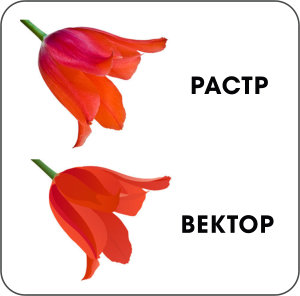
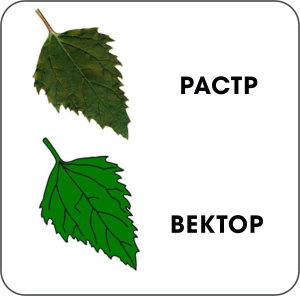
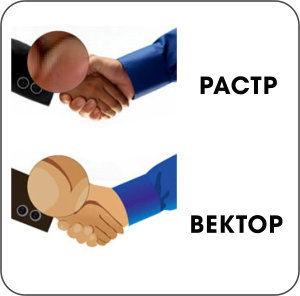
Depending on how the image is formed on the computer, graphics are divided into:
- raster;
- vector;
- fractal,
and depending on colour depth into:
- black and white;
- colour.
Let's take a closer look at vector and raster graphics.
Raster graphics
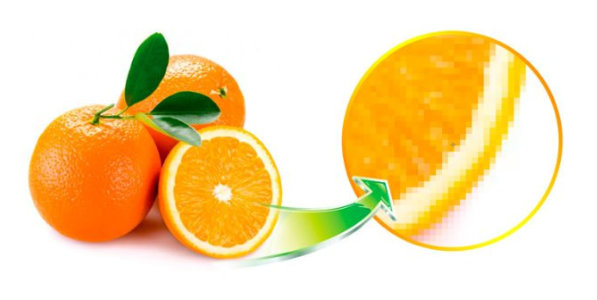
1. Features
To understand what a raster is, think of a grid, a chessboard or a mosaic made up of cells filled with pixels: in effect, a rectangular matrix.
In other words, a raster image is an array of pixels, the smallest indivisible elements, each holding colour and brightness information. The pixels themselves are invisible to the human eye and are perceived as a single continuous whole.
But when the image is enlarged or scaled, the grid becomes visible on screen or in print. That is why resolution is an important concept in raster graphics: the number of dots per unit of length, written as dpi (dots per inch). The more dots (pixels) per inch, the better and sharper the image looks.
Sources of raster images include digital cameras, video cameras, scanners and various medical equipment. The most popular raster graphics editor is Photoshop. The most popular file formats are JPEG, PNG and GIF.
2. Advantages and applications
- especially popular where a photorealistic effect is needed: publishing, advertising production, large-format printing, web technologies, user interfaces, collages, photo editing and more;
- reproduces images of any complexity perfectly, with any amount of detail, colours, shades and smooth gradients;
- uses more familiar and simpler tools for creating and editing than vector graphics, so it is easier to work with.
3. Disadvantages
- raster images are large (even the simplest one takes up more megabytes than its vector equivalent);
- they cannot be scaled without losing the original image quality.
Vector graphics
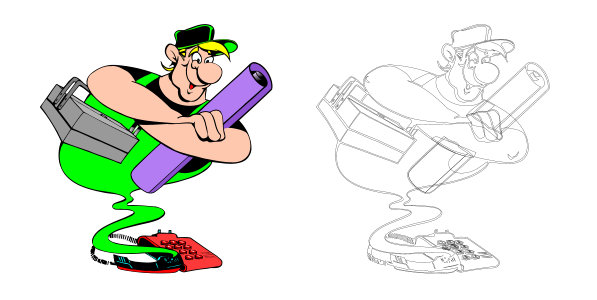
1. Features
Here there are no pixels. The building blocks of vector graphics are anchor points and the curves connecting them, whose curvature is described by mathematical formulas (also called functions or vectors).
This does not mean that you or the designer need to know higher mathematics, remember all sorts of formulas or be an expert in parabolas and sine waves. Graphics editors are designed precisely for this: they let you place points and connect them with lines by dragging the mouse. That is how shapes are created in an image.
The most popular programs for vector graphics are Adobe Illustrator and CorelDRAW. The most popular file formats are SVG and AI.
You may be familiar with the Bézier curve, named after the French mathematician who used mathematical curves to design Renault car bodies. It is the most commonly used universal, fairly simple and geometrically intuitive formula for building vector graphics, because it keeps its shape when scaled.
2. Advantages and applications
- the objects that make up vector images are small in file size and easy to modify;
- even a large enlargement of a graphic object does not reduce image quality. If you print a logo from a vector file on a business card and then on a billboard, its quality stays the same, and it looks equally good in both;
- especially popular in printing and print advertising: booklets, flyers, business cards and so on, i.e. products containing text, brand symbols, ornaments and any other elements that can be described by curves;
- used for technical drawings and social media icons.
3. Disadvantages
- unlike raster graphics, vector graphics are completely unsuitable for creating and displaying complex photorealistic images with smooth colour transitions, so they are only good for simple elements;
- not as easy to work with as raster graphics, requiring considerable additional professional skills to create and edit, as well as more computing power;
- not every scene can be rendered as vectors, especially complex images with a wide colour range that would require a huge number of points and curves.
To sum up
Can vector and raster graphics be combined? Yes. It all depends on the experience of the designer you work with. Vector objects are easily converted into raster ones (there are special converters for this), but the reverse is much harder.
But why complicate things? Each type of graphics has its pros and cons, because each serves different purposes. The main thing is to understand what task you face and what the end result should be.



-
![About us]() About us
About us
-
![Contacts]() Contacts
Contacts
-
![Payment]() Payment
Payment
-
![DELIVERY]() DELIVERY
DELIVERY
-
![Gallery]() Gallery
Gallery
-
![For designers]() For designers
For designers
-
![Print-ready artwork requirements]() Print-ready artwork requirements
Print-ready artwork requirements
-
![Aluminium composite colour range]() Aluminium composite colour range
Aluminium composite colour range
-
![Chipboard colour palette in stock]() Chipboard colour palette in stock
Chipboard colour palette in stock
-
![Artwork approval rules]() Artwork approval rules
Artwork approval rules
-
![LED neon colours]() LED neon colours
LED neon colours
-
![Artwork design]() Artwork design
Artwork design
-
![RAL colour chart]() RAL colour chart
RAL colour chart
-
![Pantone colour chart]() Pantone colour chart
Pantone colour chart
-
![Series 641 – economy]() Series 641 – economy
Series 641 – economy
-
![Altuglas coloured acrylic palette]() Altuglas coloured acrylic palette
Altuglas coloured acrylic palette
-
![Two-layer plastic colour palette]() Two-layer plastic colour palette
Two-layer plastic colour palette
-
![Useful articles about advertising]() Useful articles about advertising
Useful articles about advertising
-
 About us
  Company documents
  Contacts
  Payment
  DELIVERY
  Gallery
  For designers
  Print-ready artwork requirements
  Aluminium composite colour range
  Chipboard colour palette in stock
  Artwork approval rules
  LED neon colours
  Artwork design
  RAL colour chart
  Pantone colour chart
  Series 641 – economy
  Altuglas coloured acrylic palette
  Two-layer plastic colour palette
  Useful articles about advertising